


Sun Sentinel
2.8268.00 Reviews
App Specs
- Version
- 10.0.60
- Updated On
- License
- Free
- Downloads
- 50,000+
- Developer
- Tribune Publishing Inc.
- Categories
- News & Magazines
- Platform
- Android
Screenshots

 Analysis by AppCompare
I use news apps differently depending on the day: sometimes I want a quick local check-in, and sometimes I need to follow a story beyond the headline. Sun Sentinel is aimed at readers who want a mobile home for the newspaper’s coverage, rather than a broad feed that pulls headlines from publishers everywhere. That focus can be useful if its reporting is relevant to your daily life, but it also means the app is not automatically the best fit for someone looking for a neutral, all-in-one news aggregator.
My main takeaway is that this is a publication-first experience. It brings Sun Sentinel journalism to a phone and offers ways to tailor what you see, while asking readers to accept the limits of relying on one news source. I would consider it for keeping up with local coverage and the publication’s longer stories; I would pair it with other sources when I want a wider range of reporting or a different editorial perspective.
What a publication-led news app does well
A single publisher’s app can make a morning news check less scattered. Instead of opening several websites and trying to remember where a story appeared, you can start with one publication’s latest coverage and move through its sections. For a reader following the same local issues day after day, that continuity is more useful than a constantly reshuffled stream of national headlines.
The practical value depends on how you read. If you have a few minutes before work, a quick scan of the main stories can help you decide what deserves more attention. If an issue affects your neighborhood, you can return to the publication’s coverage rather than starting your search from scratch each time. I find that workflow more useful than treating every headline as a separate item to consume and forget.
Where it fits beside other news sources
Compared with a general news aggregator, Sun Sentinel has a narrower editorial lens: the advantage is a consistent source, while the trade-off is less variety in one place. Aggregators can be better when I want to compare how several outlets frame the same event. A publisher’s app is more appealing when I already know whose reporting I want to follow and prefer not to hunt for it across the web.
It is also different from simply checking a newspaper website in a browser. An installed app gives the publication a place on your home screen and can make repeat visits feel more direct. Still, I would not assume that an app alone makes a news routine complete. For national or international stories, I’d use additional reputable outlets; for a focused look at Sun Sentinel coverage, this is the more convenient starting point.
Who is most likely to get value from it
I’d recommend trying it if you regularly look for Sun Sentinel reporting, especially when local developments matter to your plans or conversations. It may suit commuters, residents keeping an eye on community issues, and readers who prefer returning to one publication instead of building a new search every day. The best reason to install it is not simply wanting “more news,” but wanting this publication’s coverage within easy reach.
Worth Reading Before You Choose

EA SPORTS FC Mobile 26 Is a Bigger Football Game, but It Takes Time

Flipboard Shows What News Apps Must Do Beyond the Feed

Switching to Android Auto Means Rethinking Your Driving Routine

Google Calendar Makes a Crowded Week Easier to Manage

Ludo King Makes the Most of the Minutes Between Plans

Baby Panda World Brings Quick Play to Modern Phones, but Its Game Library Feels Busy
On the other hand, readers who rarely follow the publication, prefer a multi-source briefing, or want every article they open to come from a different outlet may be happier with an aggregator or a few trusted news sites. A dedicated app can streamline access, but it cannot provide the breadth that comes from deliberately consulting multiple publications. I’d also be cautious about making any news app the only source for a major decision; comparing reports is a sensible habit.
A Quick Peek at Sun Sentinel
So, what’s the buzz about the Sun Sentinel? Well, it’s a news app that brings you the latest happenings right to your mobile device. Whether you're into local events or international affairs, this app has got your back. With its user-friendly interface, even those who aren’t tech-savvy can navigate it with ease.
Features That Stand Out
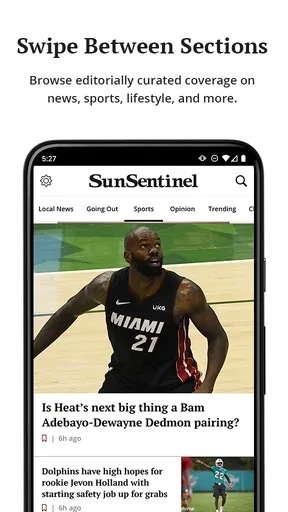
First off, let’s talk about the interface. It’s clean, minimalistic, and doesn’t bombard you with unnecessary clutter. The moment you open it, you’re greeted with the top stories of the day. But here’s the kicker: you can customize your feed. Simply follow the topics that tickle your fancy and the app will prioritize those stories for you. It’s like having your very own personalized newspaper!
Another noteworthy feature is the alert system. You can set it up to notify you about breaking news, weather updates, or even local sports scores. Trust me when I say this; it’s super handy. Plus, for those who love a deeper dive, there are in-depth articles and opinion pieces that offer various perspectives on trending topics.
User Experience and Navigation
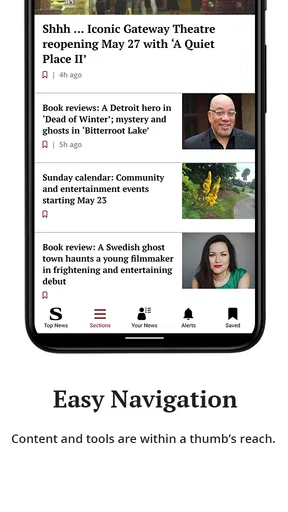
Now, let’s dive into the user experience. Navigating through the app feels seamless. The categories are clearly defined, making it a breeze to jump from one section to another. Whether you're skimming through politics, diving into entertainment, or checking out the latest sports updates, everything is just a tap away.
One feature that really struck me was the offline reading option. If you’re someone who’s often on the move and doesn’t always have access to the internet, this is a lifesaver. Simply download articles when you’re connected, and you can read them even when you’re off the grid.
Why You Should Give It a Shot
Let’s be real—everyone loves convenience, and that’s exactly what this app offers. Instead of flipping through channels or multiple websites, you’ve got everything consolidated in one place. It’s like having a trusty sidekick that keeps you informed.
Moreover, the app is constantly updated with new features and improvements based on user feedback. This shows the developers genuinely care about enhancing the user experience, which is always a plus in my book.
Final Thoughts
In a world where information is key, having a reliable news app like Sun Sentinel is invaluable. It saves you time, keeps you informed, and is incredibly easy to use. Whether you’re a news junkie or someone who just wants to stay updated, this app is definitely worth a download.
So, why not give it a shot? Head over to your app store, download it, and let me know what you think. Who knows, it might just become your go-to source for all things news!
How I’d make it part of a daily routine
A realistic way to use a local paper’s app is to give it a defined place in the day rather than letting every notification interrupt you. I’d open it with breakfast or during a commute, scan the leading coverage, and save my attention for stories connected to the places and issues I care about. If alerts are enabled, I’d keep them focused on genuinely time-sensitive subjects; too many notifications can turn a useful news check into background noise.
For example, someone planning an evening around local conditions could glance at the app before leaving home, then return later for a fuller account of a developing community story. The quick check and the deeper read serve different purposes. I would not treat a headline notification as the whole story: opening the article gives important context, and a second source can help when the subject is contentious or consequential.
Making customization and offline reading work for you
Personalization is most useful when it narrows distractions without hiding the variety you still want. I’d follow topics that regularly affect my life, but periodically revisit those choices instead of allowing an old interest to define the entire feed. A tailored front page saves time, yet it can also make it easier to miss coverage outside the subjects you selected. For a balanced routine, I’d leave room to browse the broader sections now and then.
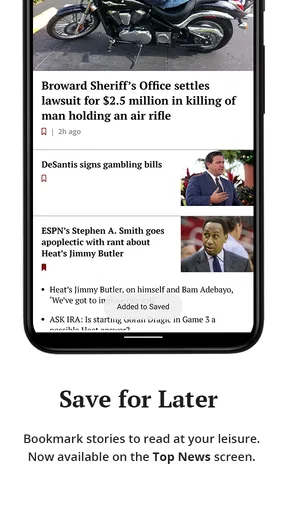
Offline reading is especially handy when you know you’ll be somewhere with a weak connection: open the articles you intend to read while you are online, then check that they are available before you head out. That is a more dependable plan than waiting until a train ride or a quiet break to load a story. I’d use it for longer reads rather than trying to download everything, which keeps the habit intentional and makes the saved articles easier to find.
Access, cost, and expectations
The app is free to install, and Sun Sentinel is published by Tribune Publishing Inc. Some purchases are offered inside the app, so I would check the purchase details shown on the device before committing to anything. That distinction matters: downloading an app at no charge does not necessarily mean every piece of publication content is available without payment. If you mainly want occasional headlines, consider how often you would use it before deciding whether an in-app purchase makes sense for you.
For readers comparing options, the key question is whether they want convenient access to one publication or a broader selection assembled elsewhere. A free aggregator may be a better match for scanning many outlets, while a newspaper’s own app is a more direct choice for following its reporting. Neither approach guarantees better journalism by itself; the value comes from the reporting you need and whether the reading experience fits your habits.
What to check before settling in
The app is rated for Everyone, runs on Android starting with version 8.0, and its current release is 10.0.52. It has passed 50,000 installs, while its average rating is 2.7 from 547 ratings, alongside 268 written reviews. I would treat that rating as a reason to set expectations rather than a verdict on every reader’s experience: people use news apps differently, and a publication-focused product may satisfy a regular local reader more than someone expecting a polished, all-purpose aggregator.
If you are deciding whether to keep it, try a simple test over several days: does it help you find useful Sun Sentinel reporting faster than your browser or your existing news app? Notice whether the sections make sense to you, whether alerts feel worthwhile, and whether the stories you want are accessible on terms you accept. That gives a more practical answer than installing it and judging it after one quick scroll.
My recommendation
I’d give Sun Sentinel a try if its coverage is part of the news you already seek, and I’d use its topic choices and alerts selectively rather than turning every option on at once. Its strongest case is focused access to a familiar publication, with a reading experience that can fit into short daily check-ins as well as longer sessions. The main trade-off is just as clear: one publisher cannot offer the range of perspectives that a multi-source routine provides, and in-app purchases deserve a careful look before you spend.
For someone who wants local reporting from this publication close at hand, it is a reasonable option to test. For someone who wants a broad, cross-publication briefing or rarely reads Sun Sentinel, I’d choose a different starting point and keep this one off the home screen. The right choice depends less on wanting news in general than on whether this particular source earns a regular place in your day.
Pros
- Up-to-date local news coverage.
- User-friendly interface design.
- Customizable notification settings.
- In-depth investigative journalism.
- Regularly updated sports section.
Cons
- Frequent ads interrupt reading.
- Limited free content access.
- Occasional app performance lags.
- Subscription required for full access.
- No offline reading mode available.
FAQs for Sun Sentinel
What is Sun Sentinel and what features does it offer?
Sun Sentinel is a comprehensive news app that provides users with the latest local and national news, sports updates, weather forecasts, and more. It features real-time notifications, customizable news categories, and an intuitive interface for easy navigation. Users can also access editorial content, opinion pieces, and video news clips.
Is there a subscription fee for accessing Sun Sentinel content?
While Sun Sentinel offers some free content, full access to all articles and features typically requires a subscription. Users can choose from various plans, including monthly or annual subscriptions. The app may also offer promotional trials, allowing new users to explore premium content before committing to a paid plan.
How user-friendly is the Sun Sentinel app for new users?
The Sun Sentinel app is designed with user-friendliness in mind, featuring an intuitive layout and straightforward navigation. New users can easily customize their news feed, set up notifications, and access different sections with minimal effort. The app also typically includes a tutorial or help section to guide users through its features.
Does Sun Sentinel provide offline reading options?
Yes, the Sun Sentinel app supports offline reading, allowing users to download articles for later viewing without an internet connection. This feature is particularly useful for those who want to access content while traveling or in areas with limited connectivity. Users can select specific articles or entire sections to save offline.
What devices and operating systems are compatible with Sun Sentinel?
Sun Sentinel is available on both Android and iOS platforms, ensuring compatibility with a wide range of devices including smartphones and tablets. It's important to keep the app updated to the latest version to enjoy all features and improvements. Specific device requirements are typically listed on the app's download page.


